

Quickstart
Only static asset acceleration is supported for now. The edge caches content for a long time, so don't use it for pages that depend on a signed-in session, APIs, or other dynamic content. See the default cache policy.
Overview
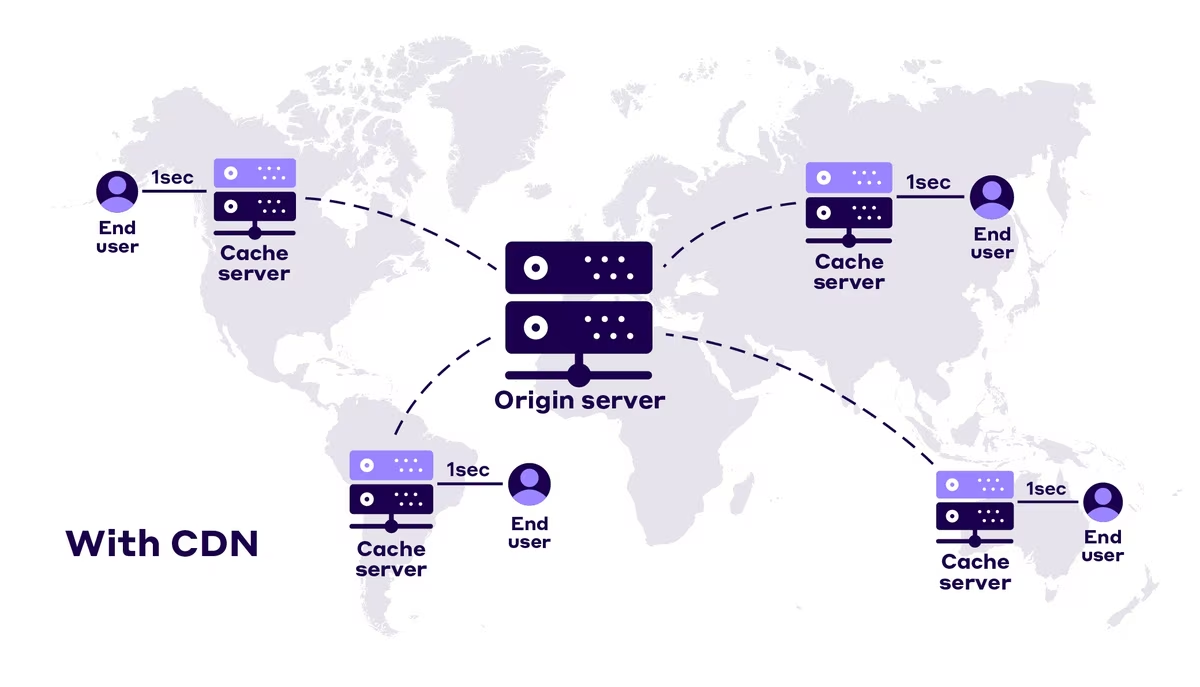
Bitiful CDN caches static files from your bucket or your own origin on nodes closer to your visitors. It has nearly 3,000 nodes across more than 70 countries and regions. Each domain can use mainland China nodes only, or global nodes.
Key features
- Supports S4 buckets (including private buckets) and custom origins
- Supports fully automatic certificates, requested, renewed, and replaced through the Certificate Center
- Supports RSA and ECC certificates, TLS 1.0 to 1.3, HTTP/2, and OCSP stapling
- Supports Referer, IP, and User-Agent lists, plus advanced authentication links
- Supports per-connection speed limits, CORS, origin path prefixes, and origin request headers
- Supports real-time access logs, cache purge, and prefetch
- Supports DDoS protection that coordinates Layer 4 and Layer 7 defenses
Before you start
| Requirement | Details |
|---|---|
| Identity verification | Complete identity verification in Account information. Otherwise, creating a domain fails with "请先完成实名认证" (complete identity verification first). After verification, you get the free tier. |
| No overdue balance | If your balance is below 0, you can't create or start domains, and you see "您当前已欠费,请先充值" (you have an overdue balance, please top up first). |
| Domain has an ICP filing | The filing is checked whether you choose Mainland China (中国大陆) or Global (全球). Without one, you see "该域名尚未备案" (this domain has not been filed). |
| You can edit the domain's DNS records | You need to add a CNAME record for the CDN domain. |
| Origin is ready | A bucket, or an HTTP/HTTPS origin reachable from the public internet. |
CDN incurs data transfer and request charges. Using a bucket as the origin also incurs S4 origin fetch charges. See Data transfer and Requests.
Steps
Add a CDN domain
- Sign in to the Bitiful console and go to CDN › Static acceleration management (静态加速管理) (open).
- Click Add new domain (添加新域名) in the upper-right corner.
- Enter the CDN domain (加速域名), such as
cdn.example.com. Don't includehttp://orhttps://. Wildcard domains such as*.example.comaren't supported. - Select the Origin type (源站类型). This example uses S4 bucket origin (S4 存储桶回源): pick your bucket under S4 bucket name (S4桶名称). To use your own origin, choose Custom origin (自定义回源) instead. See Origin settings.
- Select the Region (地区): Mainland China (中国大陆) or Global (全球).
- Click Create (创建).
After creation, the domain's status is Deploying (部署中). Deployment usually finishes within 30 seconds. When the status changes to Running (运行中), continue to the next step.
Configure the CNAME
In the domain list, copy the CNAME domain (CNAME 域名), which has the format <CDN domain>.s4cdn.dogecast.com. Then add a record at your domain's DNS provider:
| Host record | Record type | Record value |
|---|---|---|
cdn | CNAME | cdn.example.com.s4cdn.dogecast.com |
Once the record takes effect, refresh the list. The icon before the CNAME changes from a red exclamation mark to a green check (CNAME configured (已配置 CNAME)). If the same host record already has A, AAAA, or other records, delete them first.
Prepare a certificate
Go to Certificate Center › Certificate management (证书中心 › 证书管理) (open), then request an auto certificate or upload your own certificate. The certificate's domains must include this CDN domain. Wait until the dot before the certificate name turns green (Deployed (部署成功)).
Turn on HTTPS
- Go back to CDN › Static acceleration management, click Manage (管理) on the domain, and switch to HTTPS configuration (HTTPS 配置).
- On the HTTPS configuration card, click Edit (编辑) and select On (开启).
- Choose the certificate you just prepared in the Certificate (证书) drop-down. The drop-down lists only certificates that are deployed.
- To redirect HTTP to HTTPS automatically, select HTTP to HTTPS › 301 redirect (HTTP 跳转 HTTPS › 301跳转) under Force redirect (强制跳转).
- Click Save (保存) and wait until the status returns to Running.
For the other options, see HTTPS settings.
Verify
Request a file that actually exists at your origin:
# 1. Confirm DNS now points to Bitiful
dig +short CNAME cdn.example.com

# 2. Confirm the file is reachable. The response headers should include server: Bitiful
curl -I https://cdn.example.com/path/to/image.jpg
If it returns 200 with server: Bitiful, setup is complete. After that, switch the asset URLs in your website or app to the CDN domain.
Before you go live
- Restrict visitors: With a bucket origin, files are reachable directly through the CDN domain even if the bucket is private. To restrict access, configure Hotlink protection and access control.
- Control traffic: Configure a per-connection speed limit and keep an eye on your account balance.
- Update files: After you overwrite a file with the same name, the edge keeps returning the old content until you purge the cache. Versioned file names are the better approach.
FAQ
Requests to the CDN domain return 403
Check these in order: whether advanced authentication is on and the link isn't signed; whether the visitor's Referer, IP, or User-Agent is denied by a list; and whether the origin itself returns 400, 401, 402, 403, or 405 (the edge shows all of these as 403).
Requests return 404
Confirm the object key matches the URL path, which is case-sensitive. If you set an origin path prefix, the object actually read is prefix + path. See Origin settings. A 404 is cached at the edge for 5 seconds, so after you upload the missing file, wait a moment and try again.
Requests return 502
When the origin returns 500 to 506, visitors see 502. For a custom origin, confirm the address, port, protocol, and origin Host header are correct, and that the origin allows access from the CDN.
HTTPS requests fail with a certificate error or handshake failure
Confirm HTTPS configuration is on and its status isn't Deploying, and that the selected certificate covers this domain and hasn't expired.
Next steps
View status, start, stop, delete, and switch acceleration regions.
Change the origin, path prefix, and origin request headers.
Referer, IP, User-Agent, and advanced authentication.
Default cache durations, submitting purges and prefetches.